


OBDeleven VAG
4.51.70K Reviews
App Specs
- Version
- 0.107.0
- Updated On
- License
- Free
- Downloads
- 1,000,000+
- Developer
- OBDeleven
- Categories
- Auto & Vehicles
- Platform
- Android, iOS
Screenshots
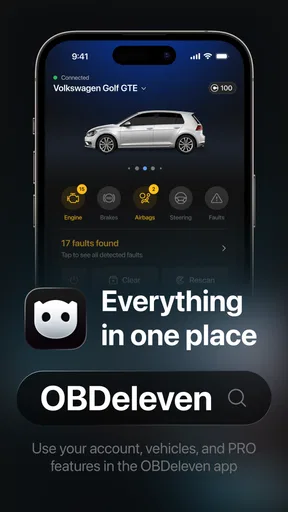
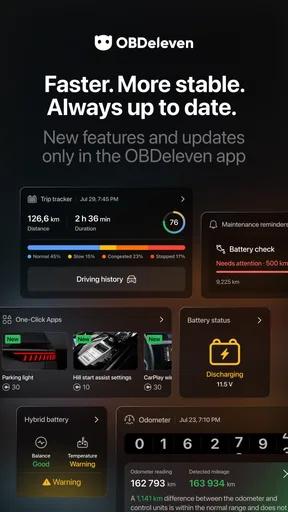
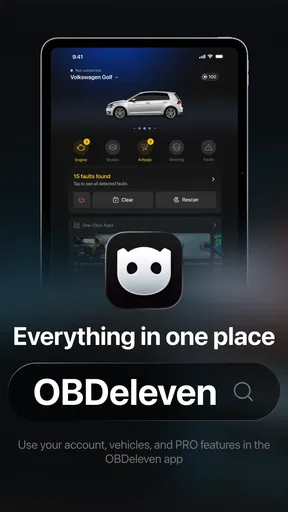
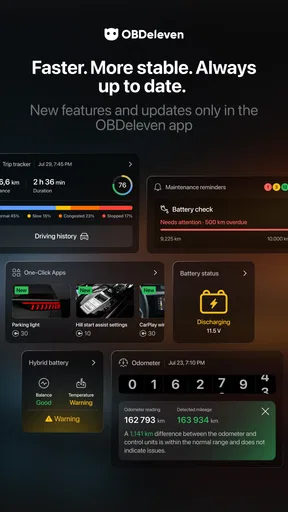
 Analysis by AppCompare
I judge a car-diagnostics app less by how impressive its menu looks and more by what it lets me understand before I decide what to do with my car. That matters with a tool that can read vehicle information and offer customizations: useful insight and changes that deserve care sit close together. OBDeleven is a free Auto & Vehicles app from OBDeleven, built around VAG diagnostics. It has an average rating of 4.4 from around 44,000 ratings, and more than a million installs, so it is clearly used by a broad audience. I would still treat popularity as context, not proof that every function is right for every vehicle or every driver.
What I would check before connecting
The app’s practical value depends on more than the screen: you need to consider the connection hardware, your specific vehicle, and the kind of task you want to perform. The app is not a magic fix for a warning light. A fault code can point toward an area to investigate, but it does not automatically identify the failed part or establish that a repair is safe to do yourself. I use diagnostic results as a starting point for a conversation or further checks, not as a substitute for sound mechanical judgment.
Before buying any compatible hardware or paying for a feature, I would confirm that the particular vehicle and intended function are supported. VAG covers several marques, but that does not mean every model, year, control unit, or customization behaves identically. A cautious first session is better than assuming a menu option applies to your car. If you only need a one-time explanation of a warning and do not want to learn vehicle diagnostics, a mechanic or a simpler code reader may be a better fit.
Account, choices, and trust
OBDeleven asks users to create an account, which is a meaningful step when an app is being used alongside a vehicle. I would take a moment to review the sign-up screens and the choices presented there, then keep account credentials private and use only the functions I understand. I do not treat an account prompt as a reason to panic, but I also would not rush through any app’s setup without noticing what I am agreeing to.
For a data-sensitive task, I prefer to separate what I can verify on screen from what I am merely assuming. Check the app’s current permission prompts and settings on your device, and grant only access that makes sense for the feature you are using. If a permission or account choice is unclear, pause and look for an explanation in the app before proceeding. That is a sensible habit with any connected car tool, especially when you are focused on a warning or trying to make a change quickly.
First Impressions
Upon downloading the app, I was immediately struck by its sleek and intuitive interface. No clutter, no jargon—just straight to the point. Connecting it to my car's OBD-II port was a breeze, thanks to the handy Bluetooth device that comes with the package. It's literally plug-and-play, which is a godsend for someone like me who’s not exactly a mechanic.
Getting Started
Once connected, the app prompted me to create an account, which took all of two minutes. Then, I was ready to dive into the world of car diagnostics. What I loved was how quickly it scanned my car and presented the data. Within moments, I was reviewing a comprehensive report on my vehicle's health.
Worth Reading Before You Choose

EA SPORTS FC Mobile 26 Is a Bigger Football Game, but It Takes Time

Flipboard Shows What News Apps Must Do Beyond the Feed

Switching to Android Auto Means Rethinking Your Driving Routine

Google Calendar Makes a Crowded Week Easier to Manage

Ludo King Makes the Most of the Minutes Between Plans

Baby Panda World Brings Quick Play to Modern Phones, but Its Game Library Feels Busy
The app provides a plethora of features, from reading and clearing trouble codes to performing advanced diagnostics. It's like having a mini workshop in your pocket. I was particularly impressed by how it breaks down complex information into easy-to-understand terms.
Features that Stand Out
One of the standout features for me is the live data functionality. It allows you to monitor real-time parameters like engine RPM, fuel consumption, and more. This feature alone is worth its weight in gold for anyone serious about maintaining their car. Plus, the app supports various models under the VAG umbrella, so you're likely covered if you own an Audi, VW, Skoda, or Seat.
Another great feature is the ability to perform customizations. Have you ever wanted to tweak your car's settings? With OBDeleven, you can adjust things like light functions, mirror settings, and even unlock hidden features. It's a tinkerer's dream!
Using the information wisely
For a real-world example, imagine a warning appears on your dashboard on the way to work. I would first make a note of the warning and how the car is behaving, then use a scan to gather context when it is safe and practical to stop. If the code is unfamiliar, I would record it rather than clear it immediately. Keeping the original result can help when you later compare what changed or explain the issue to a technician. Clearing a code without understanding the cause may remove a useful clue while leaving the underlying problem untouched.
Live readings are most useful when they answer a specific question, not when I watch numbers simply because they are available. For example, a driver who is comfortable comparing a reading across two conditions may find a pattern worth investigating, while a newcomer can easily mistake normal fluctuation for a fault. I would avoid making a diagnosis from one value in isolation. The app can make information easier to access, but deciding what it means still takes context about the vehicle and its symptoms.
Customizations call for a slower workflow
Changing a setting is different from viewing a code. Before trying a customization, I would identify the exact function, check that it is intended for my vehicle, and change only one thing at a time. That makes it easier to tell what caused a result and to undo the change if the behavior is not what I expected. I would also avoid experimenting when I depend on the car for an immediate trip; a quiet moment gives me room to verify the result without pressure.
This is where the app’s appeal to enthusiasts can also become a limitation for casual owners. A hidden option may sound harmless, but vehicle settings can affect how a feature behaves. If I cannot explain what a toggle does or how to restore the previous state, I would leave it alone and ask someone experienced. Curiosity is a good reason to explore diagnostics, not a reason to make an uncertain change.
Where it fits among alternatives
Compared with a basic code reader, OBDeleven is more appealing if you want to explore VAG-specific diagnostics and vehicle settings from a phone. A simple reader may be easier for someone who only wants a quick code lookup and has no interest in live information or customization. At the other end, a professional workshop tool and a qualified technician are the safer choice for complex faults, repair decisions, or work where a mistake could affect safety. I see this app as a useful middle ground for an informed owner, not a replacement for every tool or every mechanic.
There is also a practical cost decision beyond downloading the app. It is free to install, but in-app purchases range from $2.99 to $499.99 per item. I would decide what job I need to do before spending anything, then check the current in-app terms and whether the required hardware is separate. Someone who only wants occasional basic checks may not get enough value from paid options, while an enthusiast who uses diagnostics regularly may find a more capable setup worthwhile. The right choice depends on the vehicle and workflow, not on buying the broadest package by default.
Ease of Use
For those who might be intimidated by techy stuff, fear not. The app is designed with simplicity in mind. Each function is well-explained, and there's a helpful community forum within the app for any questions you might have. The learning curve is minimal, making it accessible for everyone.
Even so, easy navigation should not be mistaken for a risk-free process. I would keep the phone charged, make sure the car is parked safely, and avoid trying to interpret results while driving. If a scan produces a code I cannot confidently interpret, I would save the information and consult a technician rather than choosing a repair based on a guess. This approach makes the app more useful because it turns a vague dashboard warning into something specific I can discuss.
Who should consider it—and who should pass
I think it suits VAG owners who enjoy learning what their car is reporting, want a more detailed view than a basic reader offers, or are comfortable approaching settings methodically. It can also help a careful owner arrive at a repair appointment with a clearer description of a symptom. The strongest case is regular use: checking a recurring issue, reviewing data after a change in how the car behaves, or learning what a familiar vehicle’s diagnostic information looks like over time.
I would skip it if you expect an app to tell you exactly which part to replace, if you are uncomfortable reviewing technical information, or if you do not want to create an account or deal with compatible hardware. It is also not my first recommendation for urgent roadside trouble. In that situation, prioritize personal safety and appropriate roadside help; connecting a diagnostic tool is only useful when it is safe to do so. For owners of vehicles outside the VAG family, a tool specifically designed for their make may be the more sensible choice.
Pricing and Availability
While the app itself is free to download, some advanced features require in-app purchases or a subscription. Personally, I found the basic version sufficient for my needs, but if you’re someone who wants the full suite of features, the premium version is definitely worth considering.
The app is available on both Android and iOS, making it versatile and easy to access. Plus, updates are rolled out regularly, ensuring that the app is always up-to-date with the latest car models and technology.
The current version is 0.103.0, and the app requires Android 8.0 or later. It is rated Everyone, which describes its content classification rather than the skill needed to use vehicle functions responsibly. OBDeleven was released on July 10, 2014, and its long presence in the category gives new users a substantial history of public feedback to consider; the app has around 1,700 written reviews. I would still check compatibility and the details shown in the app for my own vehicle before treating any particular function as available.
Final Thoughts
All in all, OBDeleven is a fantastic tool for anyone looking to understand their car better. Whether you're a car enthusiast or someone who just wants to save on mechanic bills, this app is a must-have. It’s user-friendly, packed with features, and backed by a supportive community.
If you're keen on keeping your VAG vehicle in top shape, give OBDeleven a whirl. Trust me, you won't be disappointed. It’s a small investment for peace of mind and a deeper connection with your car.
Pros
- Easy to use interface for car diagnostics.
- Wide range of supported VAG models.
- Comprehensive real-time data display.
- Regular updates with new features.
- Customizable settings and features.
Cons
- Requires active internet connection.
- Some features need in-app purchases.
- Limited support for non-VAG models.
- Can drain smartphone battery quickly.
- May require technical knowledge for complex tasks.
FAQs for OBDeleven VAG
What is OBDeleven and how does it work?
OBDeleven is a diagnostic tool for vehicles in the Volkswagen Audi Group (VAG), enabling users to perform in-depth diagnostics, coding, and customization. It works by connecting to the car's OBD-II port and pairs with a smartphone app, allowing users to monitor vehicle systems, clear fault codes, and adjust settings.
Is OBDeleven compatible with all VAG vehicles?
OBDeleven is compatible with most VAG vehicles, including Audi, Volkswagen, Seat, and Škoda models. However, compatibility may vary depending on the vehicle's year and model. It's recommended to check the official OBDeleven website or app for a comprehensive list of supported vehicles before purchase.
Do I need a professional background to use OBDeleven?
OBDeleven is designed to be user-friendly, even for those without a professional automotive background. The app provides detailed guidance and explanations for various functions, making it accessible to both enthusiasts and professionals. However, a basic understanding of vehicle systems can enhance the experience.
What are the main features of OBDeleven?
OBDeleven offers a range of features, including reading and clearing fault codes, performing basic and advanced diagnostics, and accessing real-time data. It also supports coding and customizations, allowing users to enable or disable certain vehicle features, enhancing the driving experience.
Is there a subscription required for OBDeleven?
OBDeleven offers a free version with basic functionalities, but advanced features like coding and adaptations require a subscription, known as OBDeleven PRO. This subscription provides access to a wider range of diagnostic tools and customizations, offering more comprehensive control over vehicle settings.


